
Spring Boot Web 开发笔记:配置文件、静态资源与请求处理
整理 Spring Boot 配置与 Web 开发笔记,围绕配置来源和请求入口说明静态资源、控制器及错误处理的排查方法。
一. 配置文件
1. yml的用法
yml中配置实体类对应的属性
user:
  userName: zhangsan
  age: 18
  birthday: 2020/01/05
  animal: ['小猫',小狗,小猪] #数组写法
  intrests: #数组写法
    - 美女
    - 电影
    - 运动
  socre:  #对象写法
    english: 88
    yuwen: 90
  salarys:
    - 88.55
    - 88.66
    - 88.77
  pet:
    petName: 小花
    petAge: 2
  allPets:
    love:
      - petName: 小花
        petAge: 2
      - petName: 小哈
        petAge: 1
    hate:
      - petName: 小泰迪
        petAge: 1
    nomarl: [{petName: 小猪,petAge: 3 }]
实体类
@ToString
@Component
@ConfigurationProperties(prefix = "user")
@Data
public class SysUser {

    private String userName;
    private Integer age;
    private Date birthday;
    private List<String> animal;
    private String[] intrests;
    private Map<String,Object> socre;
    private Set<Double> salarys;
    private Map<String,List<Pet>> allPets;
    private Pet pet;


}
@Data
public class Pet {

    private String petName;
    private Integer petAge;
}
2. 自定义绑定配置提示
https://docs.spring.io/spring-boot/docs/2.5.1/reference/html/configuration-metadata.html#configuration-metadata.annotation-processor
二. web开发
1. web开发简介
2. 静态资源规则与定制化
(1). 静态资源目录
	静态资源路径META-INFO/resources    public  resources static

	访问:当前项目根路径+静态资源名

	原理:静态映射/**

	请求发到处理器,先在controller查找有没有对应的映射,如果没有,则再去静态资源寻找
(2)静态资源访问目录
自定义静态资源访问路径。
spring:
  mvc:
    static-path-pattern: /test/**
	访问: 当前根路径+static-path-pattern设置的路径+资源名称

	修改静态资源目录。根路径下的test为静态资源目录
spring:
    web:
    resources:
    static-locations: classpath:/test/
(3)流行的web目录
		webjar自动映射

		https://www.webjars.org/

		引入jequery
        <dependency>
            <groupId>org.webjars</groupId>
            <artifactId>jquery</artifactId>
            <version>3.6.0</version>
        </dependency>
访问:当前根路径/webjar/jequery/xxxx
原理,在WebMvcAutoConfiguration配置类中,资源处理的默认规则配置webjar的映射规则。
如果spring.web.resources.add-mappings设置为false 将会禁用所有静态资源规则
		@Override
		public void addResourceHandlers(ResourceHandlerRegistry registry) {
            //如果spring.web.resources.add-mappings设置为false 将会禁用所有静态资源规则
			if (!this.resourceProperties.isAddMappings()) {
				logger.debug("Default resource handling disabled");
				return;
			}
			addResourceHandler(registry, "/webjars/**", "classpath:/META-INF/resources/webjars/");
			addResourceHandler(registry, this.mvcProperties.getStaticPathPattern(), (registration) -> {
				registration.addResourceLocations(this.resourceProperties.getStaticLocations());
				if (this.servletContext != null) {
					ServletContextResource resource = new ServletContextResource(this.servletContext, SERVLET_LOCATION);
					registration.addResourceLocations(resource);
				}
			});
		}
3. welcome和favicion功能
静态资源路径下  index.html

	可以配置静态资源

	不可以配置静态资源的访问前缀,否则不能访问到index.html

可以处理/index
favicon.ico 放在静态资源目录下
spring:
#  mvc:
#    static-path-pattern: /res/**   这个会导致 Favicon 功能失效
4. 源码分析-静态资源原理
- springboot启动默认加载xxxAutoConfiguration类(自动配置类)
- SpringMVC功能的自动配置类WebMvcAutoConfiguration生效
@Configuration(proxyBeanMethods = false)
@ConditionalOnWebApplication(type = Type.SERVLET)
@ConditionalOnClass({ Servlet.class, DispatcherServlet.class, WebMvcConfigurer.class })
@ConditionalOnMissingBean(WebMvcConfigurationSupport.class)
@AutoConfigureOrder(Ordered.HIGHEST_PRECEDENCE + 10)
@AutoConfigureAfter({ DispatcherServletAutoConfiguration.class, TaskExecutionAutoConfiguration.class,
		ValidationAutoConfiguration.class })
public class WebMvcAutoConfiguration {
- 在容器中配置的mvc自动配置适配器
@Configuration(proxyBeanMethods = false)
@Import(EnableWebMvcConfiguration.class)
@EnableConfigurationProperties({ WebMvcProperties.class,
      org.springframework.boot.autoconfigure.web.ResourceProperties.class, WebProperties.class })
@Order(0)
public static class WebMvcAutoConfigurationAdapter implements WebMvcConfigurer, ServletContextAware {
关键内容WebMvcProperties.class ResourceProperties.class WebProperties.class
WebMvcProperties对应spring.mvc
ResourceProperties对应spring.resources
WebProperties对应spring.web
-
ResourceProperties默认路径
private static final String[] CLASSPATH_RESOURCE_LOCATIONS = { "classpath:/META-INF/resources/",
				"classpath:/resources/", "classpath:/static/", "classpath:/public/" };
三 请求参数处理
1.rest映射及源码分析
对于get post delete put四个请求,表单提交能正常提交get和post,但是delete和put需要进行相关配置处理
    @GetMapping("/hello")
    public String hello() {
        return "Get请求";
    }

    @PostMapping("/hello")
    public String helloPost() {
        return "Post请求";
    }

    @DeleteMapping("/hello")
    public String helloDelete() {
        return "Delete请求";
    }

    @PutMapping("/hello")
    public String helloPut() {
        return "Putt请求";
    }
-
springmvc自动配置类介绍(请求头过滤器)
@Bean @ConditionalOnMissingBean(HiddenHttpMethodFilter.class) @ConditionalOnProperty(prefix = "spring.mvc.hiddenmethod.filter", name = "enabled") public OrderedHiddenHttpMethodFilter hiddenHttpMethodFilter() { return new OrderedHiddenHttpMethodFilter(); }-
容器中没有配置HiddenHttpMethodFilter类才会自动加载该配置
-
spring.mvc.hiddenmethod.filter.enabled为true才会开启该配置(默认为false)
/** * Specify if the condition should match if the property is not set. Defaults to * {@code false}. * @return if should match if the property is missing */ boolean matchIfMissing() default false; -
表单提交方式需要为post,带上配置中的参数_method,并指定请求方式
	@Override
	protected void doFilterInternal(HttpServletRequest request, HttpServletResponse response, FilterChain filterChain)
			throws ServletException, IOException {

		HttpServletRequest requestToUse = request;
		//请求方式为post  并且请求头无错误
		if ("POST".equals(request.getMethod()) && request.getAttribute(WebUtils.ERROR_EXCEPTION_ATTRIBUTE) == null) {
			//获取参数值this.methodParam默认为_method
			String paramValue = request.getParameter(this.methodParam);
			//如果_mothod有值
			if (StringUtils.hasLength(paramValue)) {
				//进行大写转换
				String method = paramValue.toUpperCase(Locale.ENGLISH);
				//如果该请求方式在允许的请求类型中,则进行RequestWrapper转换放行
				//ALLOWED_METHODS 包含PUT DELETE PATCH
				if (ALLOWED_METHODS.contains(method)) {
					requestToUse = new HttpMethodRequestWrapper(request, method);
				}
			}
		}

		filterChain.doFilter(requestToUse, response);
	}
-
-
表单请求方式
<form method="get" action="/hello"> <input name="get" value="get-请求" type="submit"> </form> <form method="post" action="/hello"> <input name="post" value="post-请求" type="submit"> </form> <form method="post" action="/hello"> <input name="_method" value="delete" hidden="true"> <input name="delete" value="delete-请求" type="submit"> </form> <form method="post" action="/hello"> <input name="_method" value="put" hidden="true"> <input name="put" value="put-请求" type="submit"> </form> -
仅针对表单提交的请求方式进行修改,其他rest请求工具 如postMan,则不会进行该处理
2. 修改默认的_method
-
通过源码分析,真正起作用的是HiddenHttpMethodFilter类,该类中有设置methodParam的方法
public void setMethodParam(String methodParam) { Assert.hasText(methodParam, "'methodParam' must not be empty"); this.methodParam = methodParam; } -
由上分析,可以在配置类中配置,然后进行请求头参数方法设置
    @Bean
    public HiddenHttpMethodFilter hiddenHttpMethodFilter(){
        HiddenHttpMethodFilter hiddenHttpMethodFilter = new HiddenHttpMethodFilter();
        hiddenHttpMethodFilter.setMethodParam("_hello");
        return hiddenHttpMethodFilter;
    }
3. 请求映射原理
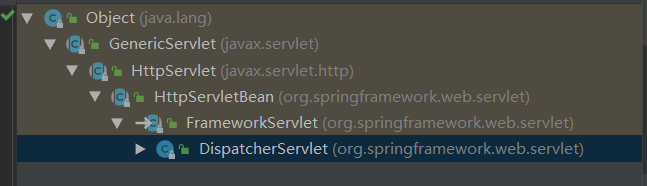
-
FrameworkServlet重写了HttpServlet的do Get/Post/delete/post等方法,都转到processRequest()方法
-
processRequest()方法最终进行doService方法处理,但是doService方法是一个抽象方法,且当前类没有实现,所以只能调用子类DispatcherServlet的doService方法
//Subclasses must implement this method to do the work of request handling, 子类必须实现该方法进行请求处理 protected abstract void doService(HttpServletRequest request, HttpServletResponse response) throws Exception; -
DispatcherServlet的doService方法,最终进行请求映射的是doDispatch(request, response);
-
doDispatch-》checkMultipart(将请求转换为多部分请求,并使多部分解析器可用,如果没有设置多部分解析器,只需使用现有请求即可)
-
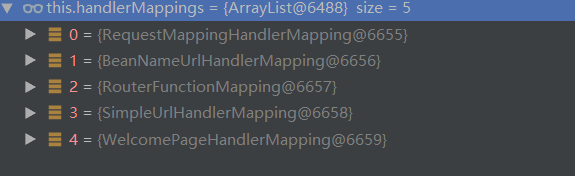
最后是getHandler(为当前请求匹配处理器)
// Determine handler for the current request.
mappedHandler = getHandler(processedRequest);

protected HandlerExecutionChain getHandler(HttpServletRequest request) throws Exception {
    	//this.handlerMappings = List<HandlerMapping> 从容器中获取的请求处理器
		if (this.handlerMappings != null) {
            //遍历获取到的所有处理器
			for (HandlerMapping mapping : this.handlerMappings) {
                //将请求处理器和当前请求进行匹配,如果匹配到了,则返回对应的处理器
				HandlerExecutionChain handler = mapping.getHandler(request);
				if (handler != null) {
					return handler;
				}
			}
		}
		return null;
	}
总结流程:前端请求到达前端控制器DispatcherServlet(doService) ---> 转到请求适配doDispatch()----> 转到请求映射处理器getHandler()--》返回匹配到的请求处理器-------》视图解析,返回前端等
4. 常用参数注解
**常用参数注解都可以使用Map<String,String> 进行参数接收**
-
@PathVariable 路径变量,用于获取rest请求路径上的参数
-
@RequestHeader 获取请求头,请求头中携带的参数
-
@RequestParam 获取请求参数,url请求中?号后的请求参数获取
-
@CookieValue 获取cookie值,获取cookie中的数据
-
@RequestBody 获取请求体数据(post)
-
@RequestAttribute 获取request域属性
//在test请求中存放的id和code参数,转发到success @GetMapping("/test") public String test(HttpServletRequest request) { request.setAttribute("id","9527"); request.setAttribute("code",200); return "forward:/success"; } //在success页面可以通过原生的request进行attribute参数获取,也可通过@RequestAttribute注解进行获取 @ResponseBody @GetMapping("/success") public Map success(HttpServletRequest request,@RequestAttribute("id") String attId) { Object id = request.getAttribute("id"); HashMap<String, Object> map = new HashMap<>(); map.put("id1",id); map.put("id2",attId); return map; } -
@MatrixVariable 矩整变量
- 在springboot中,mvc自动配置的urlPathhelper将移除url分号内容默认设置为true,所以需要使用矩整变量功能,需要先开启
//UrlPathHelper中 private boolean removeSemicolonContent = true;-
开启矩整变量功能
1. 在配置文件中配置WebMvcConfigurer,并重写configurePathMatch方法,在该方法中配置UrlPathHelper,设置移除url分号内容为false @Bean public WebMvcConfigurer webMvcConfigurer(){ return new WebMvcConfigurer(){ @Override public void configurePathMatch(PathMatchConfigurer configurer) { UrlPathHelper urlPathHelper = new UrlPathHelper(); urlPathHelper.setRemoveSemicolonContent(false); configurer.setUrlPathHelper(urlPathHelper); } }; } 2. 配置类实现WebMvcConfigurer,然后重写configurePathMatch方法,在该方法中配置UrlPathHelper,设置移除url分号内容为false import org.springframework.context.annotation.Configuration; import org.springframework.web.servlet.config.annotation.PathMatchConfigurer; import org.springframework.web.servlet.config.annotation.WebMvcConfigurer; import org.springframework.web.util.UrlPathHelper; @Configuration public class MyMvcConfigurer implements WebMvcConfigurer { @Override public void configurePathMatch(PathMatchConfigurer configurer) { UrlPathHelper urlPathHelper = new UrlPathHelper(); urlPathHelper.setRemoveSemicolonContent(false); configurer.setUrlPathHelper(urlPathHelper); } } -
矩整变量参数携带方式
1.url参数,都为一一对应
/matrix/9527;age=10;sex=1;name=王,李,赵   //  url= /matrix/9527,参数==》》age=10;sex=1;name=王,李,赵
//后台接收解析
    @ResponseBody
    @GetMapping("/matrix/{path}")
    public Map matrix(@MatrixVariable("age") Integer age, @MatrixVariable("sex")Integer sex, @MatrixVariable("name")List<String> name
    ,@PathVariable("path")String path) {
        HashMap<String, Object> map = new HashMap<>();
        map.put("age",age);
        map.put("sex",sex);
        map.put("name",name);
        map.put("path",path);
        return map;
    }
2. url参数为a对应a,b对应b
/matrix/9527;age=10/9528;age=20   //url /matrix/{id}/{id2}  参数===》》id参数为age=10 id2参数为 age=20
//后台解析 @MatrixVariable(value = "age", pathVar = "userId")  value代表获取哪个值,pathVar获取哪个参数
    @ResponseBody
    @GetMapping("/matrix/{userId}/{eqId}")
    public Map matrix(
            @MatrixVariable(value = "age", pathVar = "userId") Integer userId,
            @MatrixVariable(value = "age", pathVar = "eqId") Integer eqId
    ) {
        HashMap<String, Object> map = new HashMap<>();
        map.put("age1", userId);
        map.put("age2", eqId);
        return map;
    }
5. 请求参数处理原理
- handlerMapping中找到能处理请求的Handler(Controller.method())
- 为当前handler找到一个适配器
- 适配器执行目标方法确定方法参数的每一个值
-
找到handlerAdpter
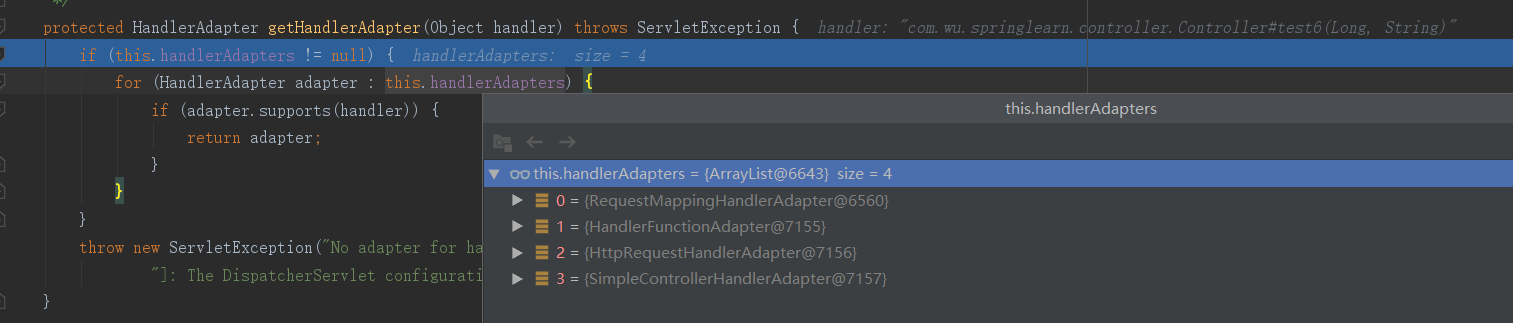
支持方法上标注RequestMapping
支持函数式编程
-
执行目标方法
// Actually invoke the handler.
1. mv = ha.handle(processedRequest, response, mappedHandler.getHandler());
//处理请求参数
2. mav = invokeHandlerMethod(request, response, handlerMethod);

3.invocableMethod.invokeAndHandle(webRequest, mavContainer);
4. Object returnValue = invokeForRequest(webRequest, mavContainer, providedArgs);
//获取方法的参数值
5. Object[] args = getMethodArgumentValues(request, mavContainer, providedArgs);
======RequestMappingHandlerAdapter=========
protected ModelAndView invokeHandlerMethod(HttpServletRequest request,
			HttpServletResponse response, HandlerMethod handlerMethod) throws Exception {
		//重新生成一个webRequest
		ServletWebRequest webRequest = new ServletWebRequest(request, response);
		try {
			WebDataBinderFactory binderFactory = getDataBinderFactory(handlerMethod);
			ModelFactory modelFactory = getModelFactory(handlerMethod, binderFactory);
			//生成一个可用的处理方法的handler
			ServletInvocableHandlerMethod invocableMethod = createInvocableHandlerMethod(handlerMethod);
			if (this.argumentResolvers != null) {
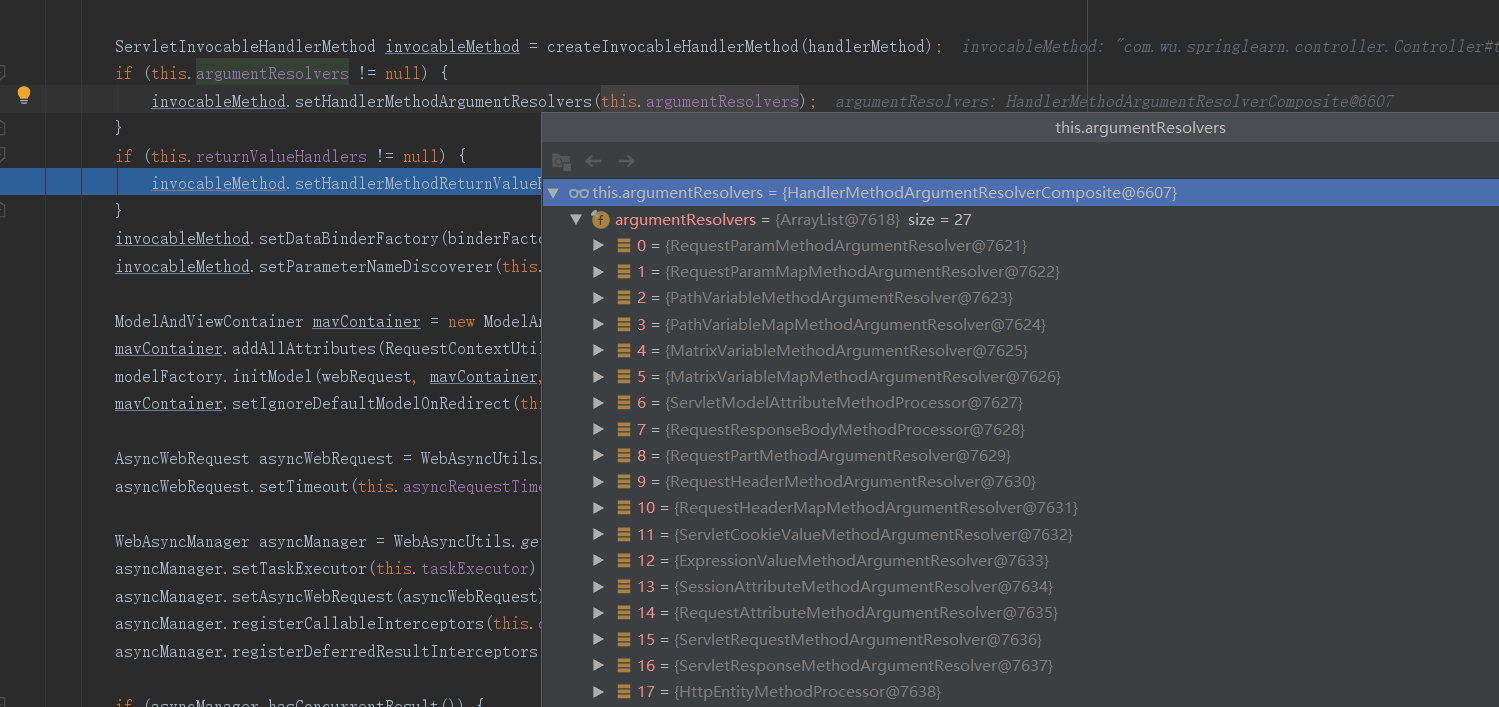
                //设置参数解析器 this.argumentResolvers中有27种解析器
				invocableMethod.setHandlerMethodArgumentResolvers(this.argumentResolvers);
			}
			if (this.returnValueHandlers != null) {
				invocableMethod.setHandlerMethodReturnValueHandlers(this.returnValueHandlers);
			}
			invocableMethod.setDataBinderFactory(binderFactory);
			invocableMethod.setParameterNameDiscoverer(this.parameterNameDiscoverer);

			ModelAndViewContainer mavContainer = new ModelAndViewContainer();
			mavContainer.addAllAttributes(RequestContextUtils.getInputFlashMap(request));
			modelFactory.initModel(webRequest, mavContainer, invocableMethod);
			mavContainer.setIgnoreDefaultModelOnRedirect(this.ignoreDefaultModelOnRedirect);

			AsyncWebRequest asyncWebRequest = WebAsyncUtils.createAsyncWebRequest(request, response);
			asyncWebRequest.setTimeout(this.asyncRequestTimeout);

			WebAsyncManager asyncManager = WebAsyncUtils.getAsyncManager(request);
			asyncManager.setTaskExecutor(this.taskExecutor);
			asyncManager.setAsyncWebRequest(asyncWebRequest);
			asyncManager.registerCallableInterceptors(this.callableInterceptors);
			asyncManager.registerDeferredResultInterceptors(this.deferredResultInterceptors);

			if (asyncManager.hasConcurrentResult()) {
				Object result = asyncManager.getConcurrentResult();
				mavContainer = (ModelAndViewContainer) asyncManager.getConcurrentResultContext()[0];
				asyncManager.clearConcurrentResult();
				LogFormatUtils.traceDebug(logger, traceOn -> {
					String formatted = LogFormatUtils.formatValue(result, !traceOn);
					return "Resume with async result [" + formatted + "]";
				});
				invocableMethod = invocableMethod.wrapConcurrentResult(result);
			}
			//调用处理器
			invocableMethod.invokeAndHandle(webRequest, mavContainer);
			if (asyncManager.isConcurrentHandlingStarted()) {
				return null;
			}

			return getModelAndView(mavContainer, modelFactory, webRequest);
		}
		finally {
			webRequest.requestCompleted();
		}
	}
-
参数解析器HandlerMethodArgumentResolver
springMVC目标方法能写多少种参数类型,取决于参数解析器
-
参数解析器确定目标方法的参数值
====InvocableHandlerMethod==== protected Object[] getMethodArgumentValues(NativeWebRequest request, @Nullable ModelAndViewContainer mavContainer, Object... providedArgs) throws Exception { MethodParameter[] parameters = getMethodParameters(); if (ObjectUtils.isEmpty(parameters)) { return EMPTY_ARGS; } Object[] args = new Object[parameters.length]; for (int i = 0; i < parameters.length; i++) { MethodParameter parameter = parameters[i]; parameter.initParameterNameDiscovery(this.parameterNameDiscoverer); args[i] = findProvidedArgument(parameter, providedArgs); if (args[i] != null) { continue; } if (!this.resolvers.supportsParameter(parameter)) { throw new IllegalStateException(formatArgumentError(parameter, "No suitable resolver")); } try { args[i] = this.resolvers.resolveArgument(parameter, mavContainer, request, this.dataBinderFactory); } catch (Exception ex) { // Leave stack trace for later, exception may actually be resolved and handled... if (logger.isDebugEnabled()) { String exMsg = ex.getMessage(); if (exMsg != null && !exMsg.contains(parameter.getExecutable().toGenericString())) { logger.debug(formatArgumentError(parameter, exMsg)); } } throw ex; } } return args; } -
返回值处理器
===ServletInvocableHandlerMethod.invokeAndHandle====
this.returnValueHandlers.handleReturnValue(
					returnValue, getReturnValueType(returnValue), mavContainer, webRequest);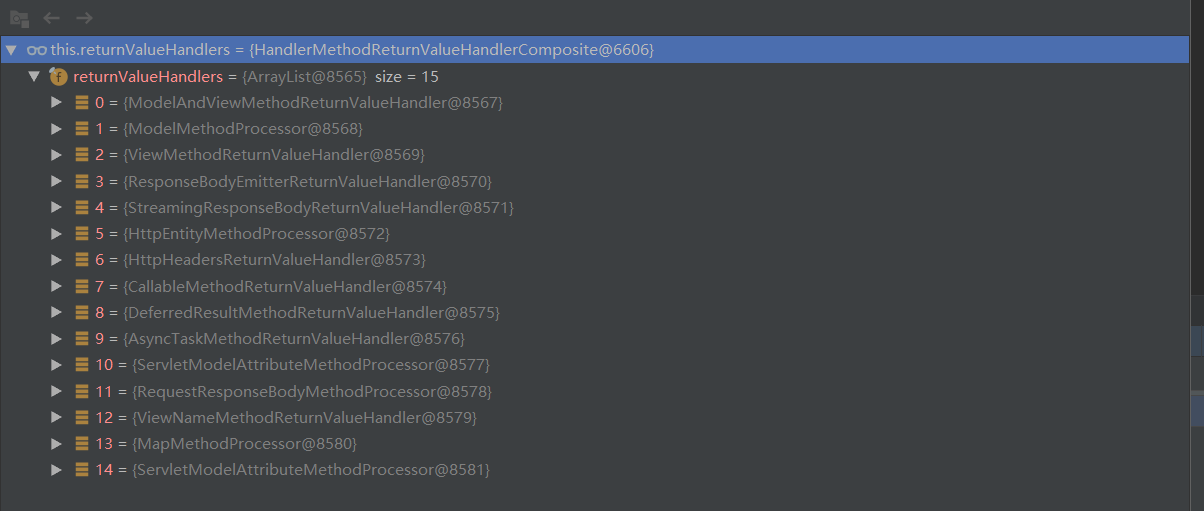
6. 自定义参数映射原理
    //接口
    @ResponseBody
    @PostMapping("/getMyUser")
    public MyUser getMyUser( MyUser myUser) {
        return myUser;
    }

	//用户对象
	public class MyUser {
        private String userName;
        private Integer userAge;
        private Pet pet;
	}
	//宠物对象
	public class Pet {
        private String petName;
        private Integer petAge;
	}

	//请求表单
	<form method="post" action="/getMyUser">
        <input name="userName" value="张三 ">
        <input name="userAge" value="20">
        <input name="pet.petName" value="hello kity">
        <input name="pet.petAge" value="2">
        <input value="提交" type="submit">
	</form>
请求参数解析总结:
//ps:断点打在doDispatch方法内,每个步骤对应1个或多个方法进入
//DispatcherServlet.doDispatch方法种执行处理方法
1. mv = ha.handle(processedRequest, response, mappedHandler.getHandler());

//RequestMappingHandlerAdapter.handleInternal方法中执行处理方法
2.mav = invokeHandlerMethod(request, response, handlerMethod);

//RequestMappingHandlerAdapter.invokeHandlerMethod方法中经过一系列初始化方法后,执行处理handler
//其中包含设置参数解析器invocableMethod.setHandlerMethodArgumentResolvers(this.argumentResolvers);
//设置返回值解析器 invocableMethod.setHandlerMethodReturnValueHandlers(this.returnValueHandlers);
3. invocableMethod.invokeAndHandle(webRequest, mavContainer);

//ServletInvocableHandlerMethod.invokeAndHandle中执行request处理方法,并返回值
4.Object returnValue = invokeForRequest(webRequest, mavContainer, providedArgs);
//InvocableHandlerMethod.invokeForRequest 继续执行
5.Object[] args = getMethodArgumentValues(request, mavContainer, providedArgs);
6.getMethodArgumentValues方法中进行参数处理
	6.1 判断是否支持提交的参数 !this.resolvers.supportsParameter(parameter)
	//从27种参数解析器中匹配是否有支持该参数的方法,匹配到后返回
	private HandlerMethodArgumentResolver getArgumentResolver(MethodParameter parameter) {
    	//先从缓存获取
		HandlerMethodArgumentResolver result = this.argumentResolverCache.get(parameter);
		if (result == null) {
            //再从容器中获取进行比对判断
			for (HandlerMethodArgumentResolver resolver : this.argumentResolvers) {
				if (resolver.supportsParameter(parameter)) {
					result = resolver;
                    //匹配成功,放入缓存
					this.argumentResolverCache.put(parameter, result);
					break;
				}
			}
		}
		return result;
	}

	6.2 解析参数 args[i] = this.resolvers.resolveArgument(parameter, mavContainer, request, this.dataBinderFactory);
	ModelAttributeMethodProcessor.resolveArgument方法中进行参数绑定
    public final Object resolveArgument(MethodParameter parameter, @Nullable ModelAndViewContainer mavContainer,
			NativeWebRequest webRequest, @Nullable WebDataBinderFactory binderFactory) throws Exception {

		Assert.state(mavContainer != null, "ModelAttributeMethodProcessor requires ModelAndViewContainer");
		Assert.state(binderFactory != null, "ModelAttributeMethodProcessor requires WebDataBinderFactory");
		//获取参数类名称
		String name = ModelFactory.getNameForParameter(parameter);
		ModelAttribute ann = parameter.getParameterAnnotation(ModelAttribute.class);
		if (ann != null) {
			mavContainer.setBinding(name, ann.binding());
		}

		Object attribute = null;
		BindingResult bindingResult = null;

		if (mavContainer.containsAttribute(name)) {
			attribute = mavContainer.getModel().get(name);
		}
		else {
			// Create attribute instance
			try {
                //创建参数对象空实例
				attribute = createAttribute(name, parameter, binderFactory, webRequest);
			}
			catch (BindException ex) {
				if (isBindExceptionRequired(parameter)) {
					// No BindingResult parameter -> fail with BindException
					throw ex;
				}
				// Otherwise, expose null/empty value and associated BindingResult
				if (parameter.getParameterType() == Optional.class) {
					attribute = Optional.empty();
				}
				else {
					attribute = ex.getTarget();
				}
				bindingResult = ex.getBindingResult();
			}
		}

		if (bindingResult == null) {
			// Bean property binding and validation;
			// skipped in case of binding failure on construction.
            //创建绑定关系
			WebDataBinder binder = binderFactory.createBinder(webRequest, attribute, name);
			if (binder.getTarget() != null) {
				if (!mavContainer.isBindingDisabled(name)) {
					//进行参数绑定
                    bindRequestParameters(binder, webRequest);
				}
				validateIfApplicable(binder, parameter);
				if (binder.getBindingResult().hasErrors() && isBindExceptionRequired(binder, parameter)) {
					throw new BindException(binder.getBindingResult());
				}
			}
			// Value type adaptation, also covering java.util.Optional
			if (!parameter.getParameterType().isInstance(attribute)) {
				attribute = binder.convertIfNecessary(binder.getTarget(), parameter.getParameterType(), parameter);
			}
			bindingResult = binder.getBindingResult();
		}

		// Add resolved attribute and BindingResult at the end of the model
		Map<String, Object> bindingResultModel = bindingResult.getModel();
		mavContainer.removeAttributes(bindingResultModel);
		mavContainer.addAllAttributes(bindingResultModel);

		return attribute;
	}

	6.3参数绑定中的参数处理AbstractNestablePropertyAccessor.processLocalProperty (由bindRequestParameters方法进入,进行多层级方法到参数处		理方法)
       由转换器进行参数值处理,将原参数处理成对象类型的参数
       valueToApply = convertForProperty(
							tokens.canonicalName, oldValue, originalValue, ph.toTypeDescriptor());
- 本文标签: Java Spring Boot Spring
- 本文链接: https://www.tianyajuanke.top/article/37
- 版权声明: 本文由吴沛芙原创发布,转载请遵循《署名-非商业性使用-相同方式共享 4.0 国际 (CC BY-NC-SA 4.0)》许可协议授权